Wednesday, May 11, 2016

Spark Faq

1. What is Apache Spark?

Wikipedia defines Apache Spark “an open source cluster computing framework originally developed in the AMPLab at University of California, Berkeley but was later donated to the Apache Software Foundation where it remains today. In contrast to Hadoop’s two-stage disk-based MapReduce paradigm, Spark’s multi-stage in-memory primitives provides performance up to 100 times faster for certain applications. By allowing user programs to load data into a cluster’s memory and query it repeatedly, Spark is well-suited to machine learning algorithms.”
Spark is essentially a fast and flexible data processing framework. It has an advanced execution engine supporting cyclic data flow with in-memory computing functionalities. Apache Spark can run on Hadoop, as a standalone system or on the cloud. Spark is capable of accessing diverse data sources including HDFS, HBase, Cassandra among others

2. Explain the key features of Spark.

• Spark allows Integration with Hadoop and files included in HDFS.
• It has an independent language (Scala) interpreter and hence comes with an interactive language shell.
• It consists of RDD’s (Resilient Distributed Datasets), that can be cached across computing nodes in a cluster.
• It supports multiple analytic tools that are used for interactive query analysis, real-time analysis and graph processing. Additionally, some of the salient features of Spark include:
Lighting fast processing: When it comes to Big Data processing, speed always matters, and Spark runs Hadoop clusters way faster than others. Spark makes this possible by reducing the number of read/write operations to the disc. It stores this intermediate processing data in memory.
Support for sophisticated analytics: In addition to simple “map” and “reduce” operations, Spark supports SQL queries, streaming data, and complex analytics such as machine learning and graph algorithms. This allows users to combine all these capabilities in a single workflow.
Real-time stream processing: Spark can handle real-time streaming. MapReduce primarily handles and processes previously stored data even though there are other frameworks to obtain real-time streaming.  Spark does this in the best way possible.

3. What is “RDD”?

RDD stands for Resilient Distribution Datasets: a collection of fault-tolerant operational elements that run in parallel. The partitioned data in RDD is immutable and is distributed in nature.

4. How does one create RDDs in Spark?

In Spark, parallelized collections are created by calling the SparkContext “parallelize” method on an existing collection in your driver program.
                val data = Array(4,6,7,8)
                val distData = sc.parallelize(data)
Text file RDDs can be created using SparkContext’s “textFile” method. Spark has the ability to create distributed datasets from any storage source supported by Hadoop, including your local file system, HDFS, Cassandra, HBase, Amazon S3, among others. Spark supports text files, “SequenceFiles”, and any other Hadoop “InputFormat” components.
                 val inputfile = sc.textFile(“input.txt”)

5. What does the Spark Engine do?

Spark Engine is responsible for scheduling, distributing and monitoring the data application across the cluster.

6. Define “Partitions”.

A “Partition” is a smaller and logical division of data, that is similar to the “split” in Map Reduce. Partitioning is the process that helps derive logical units of data in order to speed up data processing.
Here’s an example:  val someRDD = sc.parallelize( 1 to 100, 4)
Here an RDD of 100 elements is created in four partitions, which then distributes a dummy map task before collecting the elements back to the driver program.

7. What operations does the “RDD” support?

  • Transformations
  • Actions

8. Define “Transformations” in Spark.

“Transformations” are functions applied on RDD, resulting in a new RDD. It does not execute until an action occurs. map() and filer() are examples of “transformations”, where the former applies the function assigned to it on each element of the RDD and results in another RDD. The filter() creates a new RDD by selecting elements from the current RDD.

9. Define “Action” in Spark.

An “action” helps in bringing back the data from the RDD to the local machine. Execution of “action” is the result of all transformations created previously. reduce() is an action that implements the function passed again and again until only one value is left. On the other hand, the take() action takes all the values from the RDD to the local node.

10. What are the functions of “Spark Core”?

The “SparkCore” performs an array of critical functions like memory management, monitoring jobs, fault tolerance, job scheduling and interaction with storage systems.
It is the foundation of the overall project. It provides distributed task dispatching, scheduling, and basic input and output functionalities. RDD in Spark Core makes it fault tolerance. RDD is a collection of items distributed across many nodes that can be manipulated in parallel. Spark Core provides many APIs for building and manipulating these collections.

11. What is an “RDD Lineage”?

Spark does not support data replication in the memory. In the event of any data loss, it is rebuilt using the “RDD Lineage”. It is a process that reconstructs lost data partitions.

12. What is a “Spark Driver”?

“Spark Driver” is the program that runs on the master node of the machine and declares transformations and actions on data RDDs. The driver also delivers RDD graphs to the “Master”, where the standalone cluster manager runs.

13. What is SparkContext?

“SparkContext” is the main entry point for Spark functionality. A “SparkContext” represents the connection to a Spark cluster, and can be used to create RDDs, accumulators and broadcast variables on that cluster.

14. What is Hive on Spark?

Hive is a component of Hortonworks’ Data Platform (HDP). Hive provides an SQL-like interface to data stored in the HDP. Spark users will automatically get the complete set of Hive’s rich features, including any new features that Hive might introduce in the future.
The main task around implementing the Spark execution engine for Hive lies in query planning, where Hive operator plans from the semantic analyzer which is translated to a task plan that Spark can execute. It also includes query execution, where the generated Spark plan gets actually executed in the Spark cluster.

15. Name a few commonly used Spark Ecosystems.

  • Spark SQL (Shark)
  • Spark Streaming
  • GraphX
  • MLlib
  • SparkR

16. What is “Spark Streaming”?

Spark supports stream processing, essentially an extension to the Spark API. This allows stream processing of live data streams. The data from different sources like Flume and HDFS is streamed and processed to file systems, live dashboards and databases. It is similar to batch processing as the input data is divided into streams like batches.
Business use cases for Spark streaming: Each Spark component has its own use case. Whenever you want to analyze data with the latency of less than 15 minutes and greater than 2 minutes i.e. near real time is when you use Spark streaming

17. What is “GraphX” in Spark?

“GraphX” is a component in Spark which is used for graph processing. It helps to build and transform interactive graphs.

18. What is the function of “MLlib”?

“MLlib” is Spark’s machine learning library. It aims at making machine learning easy and scalable with common learning algorithms and real-life use cases including clustering, regression filtering, and dimensional reduction among others.

19. What is “Spark SQL”?

Spark SQL is a Spark interface to work with structured as well as semi-structured data. It has the capability to load data from multiple structured sources like “textfiles”, JSON files, Parquet files, among others. Spark SQL provides a special type of RDD called SchemaRDD. These are row objects, where each object represents a record.
Here’s how you can create an SQL context in Spark SQL:
        SQL context: scala> var sqlContext=new SqlContext
        HiveContext: scala> var hc = new HIVEContext(sc)

20. What is a “Parquet” in Spark?

Parquet” is a columnar format file supported by many data processing systems. Spark SQL performs both read and write operations with the “Parquet” file.

21. What is an “Accumulator”?

“Accumulators” are Spark’s offline debuggers. Similar to “Hadoop Counters”, “Accumulators” provide the number of “events” in a program.
Accumulators are the variables that can be added through associative operations. Spark natively supports accumulators of numeric value types and standard mutable collections. “AggregrateByKey()” and “combineByKey()” uses accumulators.

22. Which file systems does Spark support?

  • Hadoop Distributed File System (HDFS)
  • Local File system
  • S3

23. What is “YARN”?

“YARN” is a large-scale, distributed operating system for big data applications. It is one of the key features of Spark, providing a central and resource management platform to deliver scalable operations across the cluster.

24. List the benefits of Spark over MapReduce.

  • Due to the availability of in-memory processing, Spark implements the processing around 10-100x faster than Hadoop MapReduce.
  • Unlike MapReduce, Spark provides in-built libraries to perform multiple tasks form the same core; like batch processing, steaming, machine learning, interactive SQL queries among others.
  • MapReduce is highly disk-dependent whereas Spark promotes caching and in-memory data storage
  • Spark is capable of iterative computation while MapReduce is not.
Additionally, Spark stores data in-memory whereas Hadoop stores data on the disk. Hadoop uses replication to achieve fault tolerance while Spark uses a different data storage model, resilient distributed datasets (RDD). It also uses a clever way of guaranteeing fault tolerance that minimizes network input and output.

25. What is a “Spark Executor”?

When “SparkContext” connects to a cluster manager, it acquires an “Executor” on the cluster nodes. “Executors” are Spark processes that run computations and store the data on the worker node. The final tasks by “SparkContext” are transferred to executors.

26. List the various types of “Cluster Managers” in Spark.

The Spark framework supports three kinds of Cluster Managers:
  • Standalone
  • Apache Mesos
  • YARN

27. What is a “worker node”?

“Worker node” refers to any node that can run the application code in a cluster.

28. Define “PageRank”.

“PageRank” is the measure of each vertex in a graph.

29. Can we do real-time processing using Spark SQL?

Not directly but we can register an existing RDD as a SQL table and trigger SQL queries on top of that.

30. What is the biggest shortcoming of Spark?

Spark utilizes more storage space compared to Hadoop and MapReduce.
Also, Spark streaming is not actually streaming, in the sense that some of the window functions cannot properly work on top of micro batching.

Sunday, May 1, 2016

String vs StringBuffer vs StringBuilder

n Java, a String is a primitive data type and almost all developers use String for a character strings operation. Other than that, Sun provided StringBuffer, StringBuilder.

What are the differences between the String, Stringbuffer, and Stringbuilder?
1. String: A string is immutable, which means that once a String is created, its value cannot be changed.
?
1
2
3
4
5
String s = "Hello";
 
s = s + " World!";
 
System.out.println(s);
When executing this code, the string Hello World! will be printed. How?
Java created a new String object and stored "Hello World!" as its value. If this style of coding is used often in a program, the program will have performance problems due to the lack of memory.
2. StringBuffer: A StringBuffer is mutable, which means once a StringBuffer object is created, we just append the content to the value of the object instead of creating a new object. Their methods are synchronized when neccessary so that the StringBuffer will be used effectively in threads. The StringBuffer runs slow in a one-thread program.
?
1
2
3
StringBuffer sb = new StringBuffer("Hello");
sb.append(" World!");
System.out.println(sb.toString()); //Hello World!
3. StringBuilder: The StringBuilder is essentially the same as StringBuffer but it is not thread-safe, that means that their methods are not synchronized. In comparison to the other Strings, the Stringbuilder runs the fastest.
?
1
2
3
StringBuilder sb = new StringBuilder("Hello");
sb.append(" World!");
System.out.println(sb.toString()); //Hello World!

Comparator and Comparable


The Comparator and Comparable interfaces are two interfaces avaiable in Java for sorting the user defined objects.
For example, if you want to sort the List of Employee Objects based on Employee Id, name, or address, you would need to use either the comparable interface or the comparator interface.

Comparable Vs Comparator

  • Both interfaces are used for comparing two different objects of same class.
  • If the source code of the class(the object about to be sorted) is accessible and modifiable, then we can implement the Comparable interface. Otherwise, if a source code is not available, we can make use of the Comparator interface.
The examples below demostrates how to use the Comparator and Comparable interfaces for sorting an Employee Object by its id.

Using the Comparable Interface 

Overriding the compareTO() method if a source code is available is the proper way to use the comparable interface.
?
1
2
3
4
5
6
7
8
9
10
11
12
13
14
15
16
17
18
19
20
21
22
23
24
25
26
27
28
29
30
31
32
33
34
35
36
37
38
39
40
import java.util.ArrayList;
import java.util.Collections;
import java.util.List;
 
class Employee implements Comparable {
    int id;
    String name;
     
    public Employee(int id, String name) {
        this.id=id;
        this.name=name;
    }
    @Override
    public int compareTo(Object o) {
        Employee emp = (Employee)o;
        return this.id-emp.id;
    }
}
 
public class EmployeeSorting {
    public static void main(String[] args) {
        List employees = new ArrayList<>();
        Employee emp1 = new Employee(3, "Jerome");
        Employee emp2 = new Employee(1, "Albert");
        Employee emp3 = new Employee(2, "Samiya");
        Employee emp4 = new Employee(5, "Stella");
        Employee emp5 = new Employee(4, "Kent");
        employees.add(emp1);
        employees.add(emp2);
        employees.add(emp3);
        employees.add(emp4);
        employees.add(emp5);
         
        Collections.sort(employees);
         
        for (Employee employee : employees) {
            System.out.println(employee.id + ", " + employee.name);
        }
    }
}
After executing the class in the example above, the output will be as follows:
     1, Albert
     2, Samiya
     3, Jerome
     4, Kent
     5, Stella
The compareTo() method should compare this object to another object and return intValue. Below are the rules for intValue
if the method returns:
  • -ve value, then the object is smaller than another object.
  • 0, then the object value is same as another value.
  • +ve value, then the object is larger than another object.

Using Comparator

When a source code is not available for the object that we want to sort, we can use the comparator interface for sorting.
In this example, we will introduce a new class that implements the comparator interface and override the compare() method and Pass the Comparator object to the sort() method of collections.
?
1
2
3
4
5
6
7
8
9
10
11
12
13
14
15
16
17
18
19
20
21
22
23
24
25
26
27
28
29
30
31
32
33
34
35
36
import java.util.ArrayList;
import java.util.Collections;
import java.util.Comparator;
import java.util.List;
 
class EmployeeComparator implements Comparator
{
    @Override
    public int compare(Object o1, Object o2) {
        Employee emp1 = (Employee)o1;
        Employee emp2 = (Employee)o2;
        return emp1.id-emp2.id;
    }
}
 
public class EmployeeSorting {
    public static void main(String[] args) {
        List employees = new ArrayList<>();
        Employee emp1 = new Employee(3, "Jerome");
        Employee emp2 = new Employee(1, "Albert");
        Employee emp3 = new Employee(2, "Samiya");
        Employee emp4 = new Employee(5, "Stella");
        Employee emp5 = new Employee(4, "Kent");
        employees.add(emp1);
        employees.add(emp2);
        employees.add(emp3);
        employees.add(emp4);
        employees.add(emp5);
         
        Collections.sort(employees, new EmployeeComparator());
         
        for (Employee employee : employees) {
            System.out.println(employee.id + ", " + employee.name);
        }
    }
}
The compare() method should compare one object with another object and return intValue

Friday, April 22, 2016

List of frequently used hadoop commands

  1. Print the Hadoop version 
    hadoop version

  2. List the contents of the root directory in HDFS
    hadoop fs -ls /hadoop fs -ls hdfs:/

  3. Create a new directory named “hadoop” below the /user/training directory in HDFS.
    hadoop fs -mkdir /user/training/hadoop
  4. Delete a file ‘customers’ from the “retail” directory.
    hadoop fs -rm hadoop/retail/customers
  5. Delete all files from the “retail” directory using a wildcard.
    hadoop fs -rm hadoop/retail/*
  6. Remove the entire retail directory and all of its contents in HDFS.
    hadoop fs -rm -r hadoop/retail
  7. To empty the trash
    hadoop fs -expunge

  8. Add the purchases.txt file from the local directory named “/home/training/” to the hadoop directory you created in HDFS
    hadoop fs -copyFromLocal c:/purchases.txt /hadoop/
  9. Add the purchases.txt file from “hadoop” directory which is present in HDFS directory to the directory “data” which is present in your local directory
    hadoop fs -copyToLocal /hadoop/purchases.txt  D:/home/training/data
  10. ‘-get’ command can be used alternaively to ‘-copyToLocal’ command
    hadoop fs -get hadoop/sample.txt /home/training/
  11. Add a sample text file from the local directory named “data” to the new directory
    hadoop fs -put c:/sample.txt /user/training/hadoop
  12. Add the entire local directory called “retail” to the  /user/training directory in HDFS.
    hadoop fs -put c:/data/retail /user/training/hadoop
  13.  cp is used to copy files between directories present in HDFS
    hadoop fs -cp /user/training/*.txt /user/training/hadoop
  14.  Move a directory from one location to other present in HDFS
    hadoop fs -mv hadoop apache_hadoop

  15. To view the contents of your text file purchases.txt which is present in your hadoop directory.
    hadoop fs -cat /hadoop/purchases.txt
  16. Display last kilobyte of the file “purchases.txt” to stdout.
    hadoop fs -tail hadoop/purchases.txt
  17.  
  18. Default file permissions are 666 in HDFS Use ‘-chmod’ command to change permissions of a file
    hadoop fs -ls hadoop/purchases.txt
    sudo -u hdfs hadoop fs -chmod 600 hadoop/purchases.txt
  19. Default names of owner and group are training,training
    # Use ‘-chown’ to change owner name and group name simultaneously
    hadoop fs -ls hadoop/purchases.txt
    sudo -u hdfs hadoop fs -chown root:root hadoop/purchases.txt
  20. Default name of group is training
    # Use ‘-chgrp’ command to change group name
    hadoop fs -ls hadoop/purchases.txt
    sudo -u hdfs hadoop fs -chgrp training hadoop/purchases.txt
  21.  
  22. Default replication factor to a file is 3.
    # Use ‘-setrep’ command to change replication factor of a file
    hadoop fs -setrep -w 2 apache_hadoop/sample.txt
  23.  
  24. Copy a directory from one node in the cluster to another node
    # Use -distcp command to copy,
    # -overwrite option to overwrite in an existing files
    # -update command to synchronize both directories
    hadoop fs -distcp hdfs://namenodeA/apache_hadoop hdfs://namenodeB/hadoop
  25.  
  26. Command to make the name node leave safe mode
    hadoop fs -expunge
    sudo -u hdfs dfsadmin -safemode leave
  27.  
  28. See how much space this directory occupies in HDFS.
    hadoop fs -du -s -h hadoop/retail
  29. Report the amount of space used and available on currently mounted filesystem
    hadoop fs -df hdfs:/
  30.  
  31. Count the number of directories,files and bytes under the paths that match the specified file pattern
    hadoop fs -count hdfs:/
  32.  
  33. Run a DFS filesystem checking utility
    hadoop fsck /
  34.  
  35. Format the namenode:
    hadoop namenode -format
  36. Starting Secondary namenode:
    hadoop secondarynamenode
  37. Run namenode:
    hadoop namenode
  38. Run data node:
    hadoop datanode
  39. Cluster Balancing:
    hadoop balancer
  40.  
  41. Last but not least, always ask for help!
    hadoop fs -help 
  42.  
  43. List all the hadoop file system shell commands
    hadoop fs

Saturday, April 2, 2016

Apache Spark

Scala on Spark cheatsheet


1. Define a object with main function -- Helloworld

object HelloWorld {
  def main(args: Array[String]) {
    println("Hello, world!")
  }
}
Execute main function:
scala> HelloWorld.main(null)
Hello, world!

2. Creating RDDs

  • Parallelized Collections:

val data = Array(1, 2, 3, 4, 5)
val distData = sc.parallelize(data)
  • External Datasets: 

val distFile = sc.textFile("data.txt")
Above command returns the content of the file:
scala> distFile.collect()
res16: Array[String] = Array(1,2,3, 4,5,6)
SparkContext.wholeTextFiles can return (filename, content).
val distFile = sc.wholeTextFiles("/tmp/tmpdir")

scala> distFile.collect()
res17: Array[(String, String)] =
Array((maprfs:/tmp/tmpdir/data3.txt,"1,2,3
4,5,6
"), (maprfs:/tmp/tmpdir/data.txt,"1,2,3
4,5,6
"), (maprfs:/tmp/tmpdir/data2.txt,"1,2,3
4,5,6
"))

3. RDD Operations

  • Transformations (which create a new dataset from an existing one) Lazy!

3.1 map(f:T-U)

Return a new distributed dataset formed by passing each element of the source through a function func.
Example 1: To calculate the length of each line.

scala> lines.map(s => s.length).collect
res46: Array[Int] = Array(48, 25, 34, 5, 6, 6, 5, 5, 6)  

3.2 filter(f:T->Bool)

Return a new dataset formed by selecting those elements of the source on which func returns true.
Example 1: Find the lines which starts with "APPLE":
scala> lines.filter(_.startsWith("APPLE")).collect
res50: Array[String] = Array(APPLE)
Example 2: Find the lines which contains "test":
scala> lines.filter(_.contains("test")).collect
res54: Array[String] = Array("This is a test data text file for Spark to use. ", "To test Scala and Spark, ")

3.3 flatMap(func)

Similar to map, but each input item can be mapped to 0 or more output items (so func should return a Seq rather than a single item).
Example 1: Generate the Int List and compare "map" and "flatMap".
scala> val intlist = List( 1,2,3,4,5 )
intlist: List[Int] = List(1, 2, 3, 4, 5)

scala> intlist.map(x=>List(x,x*2))
res72: List[List[Int]] = List(List(1, 2), List(2, 4), List(3, 6), List(4, 8), List(5, 10))

scala> intlist.flatMap(x=>(List(x,x*2)))
res73: List[Int] = List(1, 2, 2, 4, 3, 6, 4, 8, 5, 10)
Example 2: Use flatMap for map
scala> val m = Map(1 -> 2, 2 -> 4, 3 -> 6)
m: scala.collection.immutable.Map[Int,Int] = Map(1 -> 2, 2 -> 4, 3 -> 6)

scala> def h(k:Int, v:Int) = if (v > 2) Some(k->v) else None
h: (k: Int, v: Int)Option[(Int, Int)]

scala> m.flatMap { case (k,v) => h(k,v) }
res76: scala.collection.immutable.Map[Int,Int] = Map(2 -> 4, 3 -> 6)

3.4 mapPartitions(func)    

Similar to map, but runs separately on each partition (block) of the RDD, so func must be of type Iterator => Iterator when running on an RDD of type T.
To be simple:
map converts each element of the source RDD into a single element of the result RDD by applying a function.
mapPartitions converts each partition of the source RDD into into multiple elements of the result (possibly none).
It can improve performance by reducing new object creation in the map function.
Example 1: We have totally 9 lines here, instead of map each line, we can firstly split all 9 lines into 2 partitions, and then we only need to map twice.
Firstly we need to create a map function which accepts Iterator as inputs and also as returning value.
This function simply return the size of each partition.

def myfunc(inputs: Iterator[String]) : Iterator[Int] = {
  var results = List[Int]()
  results .::= (inputs.size)
  results.iterator
}
Then:
scala> lines.count
res12: Long = 9

scala> lines.mapPartitions(myfunc).collect
res9: Array[Int] = Array(2, 7)

3.5 mapPartitionsWithIndex(func)   

Similar to mapPartitions, but also provides func with an integer value representing the index of the partition, so func must be of type (Int, Iterator) => Iterator when running on an RDD of type T.
Example 1: Take above mapPartitions example, and here we have one more "index" as input value for map function.
def myfunc2(index: Int, inputs: Iterator[String]) : Iterator[(Int, Int)] = {
  var results = List[(Int,Int)]()
  results .::= (index, inputs.size)
  results.iterator
}
Then:
scala> lines.mapPartitionsWithIndex(myfunc2).collect
res14: Array[(Int, Int)] = Array((0,2), (1,7))

3.6 sample(withReplacement, fraction, seed)   

Sample a fraction of the data, with or without replacement, using a given random number generator seed.
Note: Comparing to takeSample, the 2nd parameter of sample() is how much percentage of the total number should be sampled. However the actual number sampled may not be exactly the same.
Example 1: Fraction = 0.5 may not be exactly 50% of total numbers. It may change.
scala> val list = sc.parallelize(1 to 9)
list: org.apache.spark.rdd.RDD[Int] = ParallelCollectionRDD[55] at parallelize at :33

scala> list.sample(true, 0.5) .collect
res63: Array[Int] = Array(7, 9)

scala> list.sample(true, 0.5) .collect
res64: Array[Int] = Array(1, 1, 2, 4, 5, 6)
Example 2: "withReplacement"=true means output may have duplicate elements, else, it will not.
scala> list.sample(true, 1).collect
res70: Array[Int] = Array(4, 4, 4, 4, 8, 8, 9, 9)

scala> list.sample(false, 1).collect
res71: Array[Int] = Array(1, 2, 3, 4, 5, 6, 7, 8, 9)
Example 3: If "seed" does not change, the result will not change.
scala> list.sample(true, 0.5, 1).collect
res73: Array[Int] = Array(5, 7, 8, 9, 9)

scala> list.sample(true, 0.5, 1).collect
res74: Array[Int] = Array(5, 7, 8, 9, 9)

3.7 union(otherDataset)   

Return a new dataset that contains the union of the elements in the source dataset and the argument.
Note: It is the same as operator "++".
Example 1: Union 2 array of Strings.
Unlike "Union" in SQL, here it will not de-duplicate.
scala> val list  = sc.parallelize(List("apple", "orange", "banana", "apple", "orange"))
scala> val list2 = sc.parallelize(List("mapr", "cloudera", "hortonworks"))

scala> (list union list2).collect
res4: Array[String] = Array(apple, orange, banana, apple, orange, mapr, cloudera, hortonworks)

scala> (list ++ list2).collect
res5: Array[String] = Array(apple, orange, banana, apple, orange, mapr, cloudera, hortonworks)

3.8 intersection(otherDataset)   

Return a new RDD that contains the intersection of elements in the source dataset and the argument.
Note: It will do de-duplicate here.
Example 1: Intersection 2 array of Strings. However the result only contains one "apple" although each of the arrays has more than one.
scala> val list  = sc.parallelize(List("apple", "orange", "banana", "apple", "orange"))
scala> val list2 = sc.parallelize(List("apple", "mapr", "apple" ))

list.intersection(list2).collect
res7: Array[String] = Array(apple)

3.9 distinct([numTasks]))   

Return a new dataset that contains the distinct elements of the source dataset.
Example 1: Return distinct values from one array.
scala> val list  = sc.parallelize(List("apple", "orange", "banana", "apple", "orange"))
scala> list.distinct.collect
res13: Array[String] = Array(orange, apple, banana)

3.10 groupByKey([numTasks])   

When called on a dataset of (K, V) pairs, returns a dataset of (K, Iterable) pairs.
Note: If you are grouping in order to perform an aggregation (such as a sum or average) over each key, using reduceByKey or combineByKey will yield much better performance.
Note: By default, the level of parallelism in the output depends on the number of partitions of the parent RDD. You can pass an optional numTasks argument to set a different number of tasks.
Example 1: Group by a list of (K,V) pairs.
scala> val kv = sc.parallelize( List(("apple", 1), ("orange", 2), ("banana", 3), ("apple", 2)) )

scala> kv.groupByKey.collect
res14: Array[(String, Iterable[Int])] = Array((orange,ArrayBuffer(2)), (apple,ArrayBuffer(1, 2)), (banana,ArrayBuffer(3)))

3.11 reduceByKey(func, [numTasks])   

When called on a dataset of (K, V) pairs, returns a dataset of (K, V) pairs where the values for each key are aggregated using the given reduce function func, which must be of type (V,V) => V. Like in groupByKey, the number of reduce tasks is configurable through an optional second argument.
Example 1: Take above example to calculate the total sum of value for each key.
scala> kv.reduceByKey(_ + _ ).collect
res19: Array[(String, Int)] = Array((orange,2), (apple,3), (banana,3))

3.12 aggregateByKey(zeroValue)(seqOp, combOp, [numTasks])    

When called on a dataset of (K, V) pairs, returns a dataset of (K, U) pairs where the values for each key are aggregated using the given combine functions and a neutral "zero" value. Allows an aggregated value type that is different than the input value type, while avoiding unnecessary allocations. Like in groupByKey, the number of reduce tasks is configurable through an optional second argument.
Example 1:Take above example to debug the functions.
scala> kv.aggregateByKey("")(  ( (a,b) => "DEBUG:" + "a=" + a + " b=" + b ), ((v1, v2) => v1 + " and " + v2) ).collect
res34: Array[(String, String)] = Array((orange,DEBUG:a= b=2), (apple,DEBUG:a= b=1 and DEBUG:a= b=2), (banana,DEBUG:a= b=3))

3.13 sortByKey([ascending], [numTasks])   

When called on a dataset of (K, V) pairs where K implements Ordered, returns a dataset of (K, V) pairs sorted by keys in ascending or descending order, as specified in the boolean ascending argument.
Example 1:Take above example to sort by key asc or desc.
scala> kv.sortByKey(true).collect
res35: Array[(String, Int)] = Array((apple,2), (apple,1), (banana,3), (orange,2))

scala> kv.sortByKey(false).collect
res36: Array[(String, Int)] = Array((orange,2), (banana,3), (apple,2), (apple,1))

3.14 join(otherDataset, [numTasks])   

When called on datasets of type (K, V) and (K, W), returns a dataset of (K, (V, W)) pairs with all pairs of elements for each key. Outer joins are also supported through leftOuterJoin and rightOuterJoin.
Example 1: Inner Join
scala> val kv = sc.parallelize( List(("apple", 1), ("orange", 2), ("banana", 3), ("apple", 2)) )
scala> val kw = sc.parallelize( List(("apple", 999), ("orange", 222) ))

scala> kv.join(kw).collect
res37: Array[(String, (Int, Int))] = Array((orange,(2,222)), (apple,(1,999)), (apple,(2,999)))
Example 2: Left Outer Join
scala> kv.leftOuterJoin(kw).collect
res38: Array[(String, (Int, Option[Int]))] = Array((orange,(2,Some(222))), (apple,(2,Some(999))), (apple,(1,Some(999))), (banana,(3,None)))
Example 3: Right Outer Join
scala> kv.rightOuterJoin(kw).collect
res39: Array[(String, (Option[Int], Int))] = Array((orange,(Some(2),222)), (apple,(Some(1),999)), (apple,(Some(2),999)))

3.15 cogroup(otherDataset, [numTasks])   

When called on datasets of type (K, V) and (K, W), returns a dataset of (K, Iterable, Iterable) tuples. This operation is also called groupWith.
Example 1: 2 RDDs GroupWith.
scala> kv.cogroup(kw).collect
res40: Array[(String, (Iterable[Int], Iterable[Int]))] = Array((orange,(CompactBuffer(2),CompactBuffer(222))), (apple,(CompactBuffer(2, 1),CompactBuffer(999))), (banana,(CompactBuffer(3),CompactBuffer())))
Example 1: 3 RDDs GroupWith.
scala> val kw2 = sc.parallelize( List(("banana", 123), ("banana", 456) ))

scala> kv.cogroup(kw,kw2).collect
res41: Array[(String, (Iterable[Int], Iterable[Int], Iterable[Int]))] = Array((orange,(CompactBuffer(2),CompactBuffer(222),CompactBuffer())), (apple,(CompactBuffer(1, 2),CompactBuffer(999),CompactBuffer())), (banana,(CompactBuffer(3),CompactBuffer(),CompactBuffer(123, 456))))

3.16 cartesian(otherDataset)   

When called on datasets of types T and U, returns a dataset of (T, U) pairs (all pairs of elements). Example 1: 2 RDDs cartesian sets.
scala> val a = sc.parallelize(List(1,2,3))
scala> val b = sc.parallelize(List(4,5,6))
scala> a.cartesian(b).collect
res42: Array[(Int, Int)] = Array((1,4), (1,5), (1,6), (2,4), (3,4), (2,5), (2,6), (3,5), (3,6))

3.17 pipe(command, [envVars])   

Pipe each partition of the RDD through a shell command, e.g. a Perl or bash script. RDD elements are written to the process's stdin and lines output to its stdout are returned as an RDD of strings.
Example 1: Split a List to 2 partitions, and the command will be executed from each partition.
scala> val list  = sc.parallelize(List("apple", "orange", "banana", "mapr", "cloudera" , "hortonworks") , 2)

scala> list.pipe("tail -1").collect
res34: Array[String] = Array(banana, hortonworks)

scala> list.pipe("tail -2").collect
res35: Array[String] = Array(orange, banana, cloudera, hortonworks)

3.18 coalesce(numPartitions)    

Decrease the number of partitions in the RDD to numPartitions. Useful for running operations more efficiently after filtering down a large dataset.
Example 1: Reduce above "list" from 2 partitions to 1 partition. Comparing the differences.
scala> list.coalesce(1, false).pipe("tail -1").collect
res37: Array[String] = Array(hortonworks)

scala> list.coalesce(1, false).pipe("tail -2").collect
res38: Array[String] = Array(cloudera, hortonworks)

3.19 repartition(numPartitions)   

Reshuffle the data in the RDD randomly to create either more or fewer partitions and balance it across them. This always shuffles all data over the network.
Example 1: Increase above "list" from 2 partitions to 6 partitions. Comparing the differences.
scala> list.repartition(6).pipe("tail -1").collect
res39: Array[String] = Array(hortonworks, apple, orange, banana, mapr, cloudera)
  • Actions (which return a value to the driver program after running a computation on the dataset)

3.20 reduce(f: (T, T) => T): T

Aggregate the elements of the dataset using a function func (which takes two arguments and returns one). The function should be commutative and associative so that it can be computed correctly in parallel.
Example 1: Calculate the sum of int from 1 to 9.
scala> val a = sc.parallelize(1 to 9)
a: org.apache.spark.rdd.RDD[Int] = ParallelCollectionRDD[3] at parallelize at :33

scala> a.reduce(_ + _)
res5: Int = 45

3.21 collect()

Return all the elements of the dataset as an array at the driver program. This is usually useful after a filter or other operation that returns a sufficiently small subset of the data.
Example 1: Collect all elements of List and return an Array.
scala> val list = sc.parallelize(List("apple", "orange", "banana"))
list: org.apache.spark.rdd.RDD[String] = ParallelCollectionRDD[4] at parallelize at :33

scala> list.collect
res6: Array[String] = Array(apple, orange, banana)

3.22 count()     

Return the number of elements in the dataset.
Example 1: Return number of above list.
scala> list.count
res7: Long = 3

3.23 first()     

Return the first element of the dataset (similar to take(1)).
Example 1: Return first element of above list. Similar as "limit 1" in SQL.
scala> list.first
res8: String = apple

3.24 take(n)     

Return an array with the first n elements of the dataset. Note that this is currently not executed in parallel. Instead, the driver program computes all the elements.
Example 1: Return first 2 elements of above list. Similar as "limit s" in SQL.
scala> list.take(2)
res9: Array[String] = Array(apple, orange)

3.25 takeSample(withReplacement, num, [seed])    

Return an array with a random sample of num elements of the dataset, with or without replacement, optionally pre-specifying a random number generator seed.
Note: It returns an Array instead of RDD.
Example 1: "withReplacement"=true means output may have duplicate elements, else, it will not.
scala> val list = sc.parallelize(1 to 9)
list: org.apache.spark.rdd.RDD[Int] = ParallelCollectionRDD[55] at parallelize at :33

scala> list.takeSample(true, 10)
res59: Array[Int] = Array(5, 8, 2, 4, 8, 9, 9, 1, 4, 5)

scala> list.takeSample(false, 10)
res60: Array[Int] = Array(3, 8, 2, 6, 1, 7, 5, 9, 4)
Example 2: If "seed" does not change, the result will not change.
scala>  list.takeSample(true, 5, 1)
res61: Array[Int] = Array(8, 6, 3, 8, 9)

scala>  list.takeSample(true, 5, 1)
res62: Array[Int] = Array(8, 6, 3, 8, 9)

scala>  list.takeSample(true, 5, 2)
res63: Array[Int] = Array(3, 8, 4, 8, 9)

3.26 takeOrdered(n, [ordering])     

Return the first n elements of the RDD using either their natural order or a custom comparator.
Example 1: Similar as "order by limit n" in SQL.
scala> val list = sc.parallelize(List("apple", "orange", "banan", "APPLE", "BABY","cat", "1"  , "3" , "9" ))
list: org.apache.spark.rdd.RDD[String] = ParallelCollectionRDD[64] at parallelize at :33

scala> list.takeOrdered(3)
res67: Array[String] = Array(1, 3, 9)

scala> list.takeOrdered(5)
res68: Array[String] = Array(1, 3, 9, APPLE, BABY)

3.27 saveAsTextFile(path)     

Write the elements of the dataset as a text file (or set of text files) in a given directory in the local filesystem, HDFS or any other Hadoop-supported file system. Spark will call toString on each element to convert it to a line of text in the file.
Example 1: Save above list on HDFS.
list.saveAsTextFile("/tmp/tmpout") 

# hadoop fs -ls /tmp/tmpout
Found 3 items
-rwxr-xr-x   3 root root          0 2015-02-28 02:23 /tmp/tmpout/_SUCCESS
-rwxr-xr-x   3 root root         25 2015-02-28 02:23 /tmp/tmpout/part-00000
-rwxr-xr-x   3 root root         15 2015-02-28 02:23 /tmp/tmpout/part-00001
# hadoop fs -cat /tmp/tmpout/part-00000
apple
orange
banan
APPLE
# hadoop fs -cat /tmp/tmpout/part-00001
BABY
cat
1
3
9

3.28 saveAsSequenceFile(path)

(Java and Scala)     Write the elements of the dataset as a Hadoop SequenceFile in a given path in the local filesystem, HDFS or any other Hadoop-supported file system. This is available on RDDs of key-value pairs that either implement Hadoop's Writable interface. In Scala, it is also available on types that are implicitly convertible to Writable (Spark includes conversions for basic types like Int, Double, String, etc).
Example 1: Save a key-value pair as sequence file on HDFS.
val a = sc.parallelize(Array(("apple",1), ("orange",2), ("banana",3)))
a.saveAsSequenceFile("/tmp/tmpoutseq")

# hadoop fs -ls /tmp/tmpoutseq
Found 3 items
-rwxr-xr-x   3 root root          0 2015-02-28 02:27 /tmp/tmpoutseq/_SUCCESS
-rw-r--r--   3 root root        103 2015-02-28 02:27 /tmp/tmpoutseq/part-00000
-rw-r--r--   3 root root        123 2015-02-28 02:27 /tmp/tmpoutseq/part-00001

3.29 saveAsObjectFile(path)

(Java and Scala)     Write the elements of the dataset in a simple format using Java serialization, which can then be loaded using SparkContext.objectFile().
Example 1: Save and load an object file on HDFS.
scala> val list = sc.parallelize(List("apple", "orange", "banan"))
list: org.apache.spark.rdd.RDD[String] = ParallelCollectionRDD[7] at parallelize at :12

scala> list.saveAsObjectFile("/tmp/tmpobj")

scala> val newlist = sc.objectFile[String]("/tmp/tmpobj")
newlist: org.apache.spark.rdd.RDD[String] = FlatMappedRDD[11] at objectFile at :12

scala> newlist.collect
res4: Array[String] = Array(orange, banan, apple)

3.30 countByKey()   

Only available on RDDs of type (K, V). Returns a hashmap of (K, Int) pairs with the count of each key.
Example 1: Count the List of KV pairs.
scala> val kv = sc.parallelize( List(("apple", 1), ("orange", 2), ("banana", 3), ("apple", 2)) )
kv: org.apache.spark.rdd.RDD[(String, Int)] = ParallelCollectionRDD[15] at parallelize at :12

scala> kv.countByKey
res6: scala.collection.Map[String,Long] = Map(banana -> 1, apple -> 2, orange -> 1)

3.31 foreach(func)     

Run a function func on each element of the dataset. This is usually done for side effects such as updating an accumulator variable (see below) or interacting with external storage systems.
Example 1: Calculate the sum of 1 to 4.
scala> val accum = sc.accumulator(0)
accum: org.apache.spark.Accumulator[Int] = 0

scala> sc.parallelize(Array(1, 2, 3, 4)).foreach(x => accum += x)

scala> accum.value
res24: Int = 10
In all, here is an example to calculate the total length of the file.
val lines = sc.textFile("data.txt")
val lineLengths = lines.map(s => s.length)
val totalLength = lineLengths.reduce((a, b) => a + b)
  • Persist and Unpersist RDD

Persist can save the RDD in memory or disk in this application after the first time it is computed.
lineLengths.persist()
lineLengths.unpersist()
Example 1: persist() an object in different levels.
scala> import org.apache.spark.storage.StorageLevel
import org.apache.spark.storage.StorageLevel

scala> kv.persist(StorageLevel.MEMORY_ONLY)
res9: kv.type = ParallelCollectionRDD[0] at parallelize at :12

scala> kv.getStorageLevel
res10: org.apache.spark.storage.StorageLevel = StorageLevel(false, true, false, true, 1)

scala> kv.unpersist()
res13: kv.type = ParallelCollectionRDD[0] at parallelize at :12

scala> kv.getStorageLevel
res14: org.apache.spark.storage.StorageLevel = StorageLevel(false, false, false, false, 1)

scala> kv.persist(StorageLevel.DISK_ONLY)
res15: kv.type = ParallelCollectionRDD[0] at parallelize at :12

scala> kv.getStorageLevel
res16: org.apache.spark.storage.StorageLevel = StorageLevel(true, false, false, false, 1)

4.  Functions to Spark

  • Pass reference of a function

Example to add "hello" to each element in the RDD.
def sayhello(s: String): String = "Hello " + s
lines.map(sayhello)
Result:
scala> lines.collect
res31: Array[String] = Array(1,2,3, 4,5,6)
scala> lines.map(sayhello).collect
res32: Array[String] = Array(Hello 1,2,3, Hello 4,5,6)
  • Anonymous functions

So simple way to do above stuff is:
lines.map(x => "Hello " + x)

5. KeyValue pairs

  • reduceByKey

val lines = sc.textFile("data.txt")
val pairs = lines.map(s => (s, 1))
val counts = pairs.reduceByKey((a, b) => a + b)
Sample data:
# cat data.txt
This is a test data text file for Spark to use.
To test Scala and Spark,
we need to repeat again and again.
apple
orange
banana
APPle
APPLE
ORANGE
Sample result:
scala> counts.collect
res41: Array[(String, Int)] = Array((orange,1), (APPLE,1), (ORANGE,1), (apple,1), ("This is a test data text file for Spark to use. ",1), (APPle,1), ("To test Scala and Spark, ",1), (banana,1), (we need to repeat again and again.,1))
  • sortByKey

scala>  counts.sortByKey().collect
res43: Array[(String, Int)] = Array((APPLE,1), (APPle,1), (ORANGE,1), ("This is a test data text file for Spark to use. ",1), ("To test Scala and Spark, ",1), (apple,1), (banana,1), (orange,1), (we need to repeat again and again.,1))

6. Shared Variables

  • Broadcast Variables

Broadcast variables allow the programmer to keep a read-only variable cached on each machine rather than shipping a copy of it with tasks. 
scala> val broadcastVar = sc.broadcast(Array(1, 2, 3))
broadcastVar: org.apache.spark.broadcast.Broadcast[Array[Int]] = Broadcast(0)

scala> broadcastVar.value
res18: Array[Int] = Array(1, 2, 3)
  • Accumulators

Accumulators are variables that are only “added” to through an associative operation and can therefore be efficiently supported in parallel. They can be used to implement counters (as in MapReduce) or sums.
scala> val accum = sc.accumulator(0)
accum: org.apache.spark.Accumulator[Int] = 0

scala> sc.parallelize(Array(1, 2, 3, 4)).foreach(x => accum += x)

scala> accum.value
res24: Int = 10
==

Thursday, March 31, 2016

APACHE KAFKA


Define in zookeeper.properties
dataDir=D:/Hadoop/ECOSYSTEM/Kafka/zookeeper

Define in server.properties
log.dirs=D:/Hadoop/ECOSYSTEM/Kafka/logs

Start ZOOKEEPER
start zookeeper-server-start.bat config/zookeeper.properties

Start KAFKA
start kafka-server-start.bat config/server.properties

Create a TOPIC
kafka-topics.bat --create --zookeeper localhost:2181 --replication-factor 1 --partitions 1 --topic test

List TOPIC
kafka-topics.bat --list --zookeeper localhost:2181

Start a Producer (Send Messages)
kafka-console-producer.bat --broker-list localhost:9092 --topic test
This is a message
This is another message1

Start a Consumer (receives Messages)
kafka-console-consumer.bat --zookeeper localhost:2181 --topic test --from-beginning
This is a message
This is another message

Note:- If you have each of the above commands running in a different console
then you should now be able to type messages into the producer console and
see them appear in the consumer terminal.

Display Topic Information
kafka-topics.bat --describe --zookeeper localhost:2181 --topic test

Add Partitions to a Topic
kafka-topics.bat --alter --zookeeper localhost:2181 --topic test --partitions 3

WARNING: If partitions are increased for a topic that has a key, the partition logic or
ordering of the messages will be affected

Delete Topic
kafka-run-class.bat kafka.admin.DeleteTopicCommand --zookeeper localhost:2181 --topic test

Setting up a multi broker cluster
Create config/server2.properties
    broker.id=1
    port=9094
    log.dir=log.dirs=D:/Hadoop/ECOSYSTEM/Kafka/logs1
start kafka-server-start.bat config/server2.properties

Wednesday, March 30, 2016

Apache SQOOP


What is Sqoop in Hadoop?
Apache Sqoop is an effective hadoop tool used for importing/Exporting data from RDBMS’s like MySQL, Oracle, etc. into HBase, Hive or HDFS.

How Apache Sqoop works?

Once the input is recognized by Sqoop hadoop, the metadata for the table is read and a class definition is created for the input requirements. In reality, the dataset being transferred is split into partitions and map only jobs are launched for each partition with the mappers managing transferring the dataset assigned to it.

Challenges with data ingestion in Hadoop ?

  • parallel processing
  • data quality
  • machine data on a higher scale of several gigabytes per minute
  • multiple source ingestion
  • real-time ingestion and scalability
  • Structured and Unstructured data

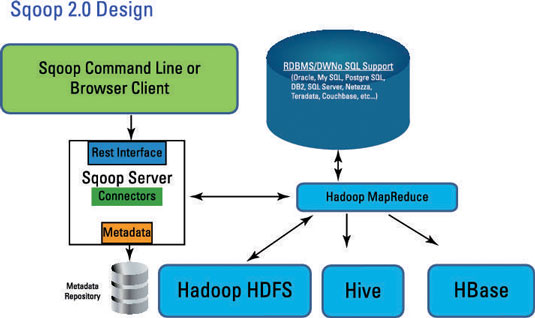
Sqoop 1.0 Design:

image0.jpg

Sqoop provides many salient features like:

  • Full/Incremental Load
  • Parallel import/export
  • Import results of SQL query
  • Compression
  • Connectors for all major RDBMS Databases
  • Kerberos Security Integration
  • Load data directly into Hbase/Hive/HDFS file system
  • Support for Accumulo

Import process:


Export process:

Basic Commands and Syntax for Sqoop:
Note: place mysql-connector-java-5.1.18-bin in lib folder of Sqoop


List available databases/tables :
$ sqoop list-databases --connect jdbc:mysql://localhost/userdb --username root --password 123
$ sqoop list-tables --connect jdbc:mysql://localhost/userdb --username root --password 123

Import Data from MySql into HDFS :
$ sqoop import --connect jdbc:mysql://localhost/userdb --username root --password 123
--table emp --m 1 --target-dir /queryresult

Executing command using options-file :
$ sqoop list-tables --options-file SqoopImportOptions.txt

Sample options-file:
##############################
# Start of Options file for sqoop import
##############################
--connect
jdbc:mysql://localhost/userdb
--username
root
--password
123
##############################
# End of Options file for sqoop import
##############################

Check file created in HDFS :
$ hadoop fs -cat  /queryresult/part*

Import all rows, but specific columns of the table :
$ sqoop import --options-file SqoopImportOptions.txt --table  emp  --columns "empno,ename" --as-textfile -m 1 --target-dir /queryresult

Import all columns, filter rows using where clause :
$ sqoop --options-file SqoopImportOptions.txt --table emp  --where "empno > 7900"  --as-textfile  -m 1  --target-dir /user/sqoop-mysql/employeeGtTest

Import with a free form query with where clause :
$ sqoop --options-file SqoopImportOptions.txt --query 'select empno,ename,sal,deptno from emp where EMP_NO < 7900 AND $CONDITIONS' -m 1 --target-dir /user/sqoop-mysql/employeeFrfrmQry1

Controlling Parallelism :
Sqoop imports data in parallel from most database sources. You can specify the number of map tasks (parallel processes) to use to perform the import by using the -m or --num-mappers argument.
When performing parallel imports, Sqoop needs a criterion by which it can split the workload. Sqoop uses a splitting column to split the workload. By default, Sqoop will identify the primary key column (if present) in a table and use it as the splitting column. The low and high values for the splitting column are retrieved from the database, and the map tasks operate on evenly-sized components of the total range.If the actual values for the primary key are not uniformly distributed across its range, then this can result in unbalanced tasks. You should explicitly choose a different column with the --split-by argument. For example, --split-by employee_id.

Note: Sqoop cannot currently split on multi-column indices. If your table has no index column, or has a multi-column key, then you must also manually choose a splitting column.

Split by refer section on controlling parallelism :
$ sqoop --options-file SqoopImportOptions.txt --query 'select EMP_NO,FIRST_NAME,LAST_NAME from employees where $CONDITIONS' --split-by EMP_NO --direct --target-dir /user/sqoop-mysql/SplitByExampleImport

Boundary query
Again related to controlling parallelism..
--boundary-query “SELECT MIN(EMP_NO), MAX(EMP_NO) from employees”

Fetch size
This argument specifies to sqoop the number of entries to read from database at once.
--fetch-size=5

Compression
Use the --compress argument to enable compression; If you dont specify a compression codec (--compression-codec), the default gzip will be used.


The command:
$ sqoop --options-file SqoopImportOptions.txt \

--query 'select EMP_NO,FIRST_NAME,LAST_NAME from employees where $CONDITIONS' \
-z \
--split-by EMP_NO \
--direct \
--target-dir /user/airawat/sqoop-mysql/CompressedSample

The output:
$ hadoop fs -ls -R sqoop-mysql/CompressedSample | grep part*

Import all tables
$ sqoop --options-file SqoopImportAllTablesOptions.txt --direct --warehouse-dir sqoop-mysql/EmployeeDatabase

Import formats
With mysql, text file is the only format supported;  Avro and Sequence file formatted imports are feasible through other RDBMS

Sqoop code-gen
Generate jar and class file for employee table

$ sqoop codegen --connect jdbc:mysql://cdh-dev01/employees \
--username myUID \
--password myPWD \
--table employees \
--outdir /user/airawat/sqoop-mysql/jars

Files created:
$ ls /tmp/sqoop-airawat/compile/879394521045bc924ad9321fe46374bc/
employees.class  employees.jar  employees.java

Copy files to your home directory:
cp /tmp/sqoop-airawat/compile/879394521045bc924ad9321fe46374bc/* .